Hello. Excited to try out Tidal (former FoxDot user) but having install problems.
I have just re-installed via the Tidal Docs using the ansible method (debian) and can get one simple pattern to play and then I have to tear down my two terminal windows (sclang and tidalyvim) as I cannot interact with tidalvim again.
Ordered list of problems:
I have to run sclang, in a terminal, twice in succession as first run gives this error
This is free software, and you are welcome to redistribute it
under certain conditions; see the file COPYING for details
JACK server starting in realtime mode with priority 10
self-connect-mode is "Don't restrict self connect requests"
audio_reservation_init
Acquire audio card Audio0
creating alsa driver ... hw:0|hw:0|1024|2|48000|0|0|nomon|swmeter|-|32bit


ATTENTION: The playback device "hw:0" is already in use. Please stop the application using it and run JACK again
JackTemporaryException : now quits...
Released audio card Audio0
audio_reservation_finish
Cannot initialize driver
JackServer::Open failed with -1
Failed to open server
Cannot connect to server socket err = Connection refused
Cannot connect to server request channel
Cannot connect to server socket err = Connection refused
Cannot connect to server request channel
I ctrl-d out of the above and run sclang again. I also note that I have no supersaw or super piano type presets so something else is missing.
sclang
compiling class library...
	Found 867 primitives.
	Compiling directory '/usr/share/SuperCollider/SCClassLibrary'
	Compiling directory '/usr/share/SuperCollider/Extensions'
	Compiling directory '/home/hurrells/.local/share/SuperCollider/Extensions'
	Compiling directory '/home/hurrells/.local/share/SuperCollider/downloaded-quarks/Vowel'
	Compiling directory '/home/hurrells/.local/share/SuperCollider/downloaded-quarks/Dirt-Samples'
	Compiling directory '/home/hurrells/.local/share/SuperCollider/downloaded-quarks/SuperDirt'
	numentries = 1302738 / 20440992 = 0.064
	5956 method selectors, 3432 classes
	method table size 21259112 bytes, big table size 163527936
	Number of Symbols 15469
	Byte Code Size 465388
	compiled 571 files in 0.64 seconds

Info: 4 methods are currently overwritten by extensions. To see which, execute:
MethodOverride.printAll

compile done
localhost : setting clientID to 0.
internal : setting clientID to 0.
Class tree inited in 0.01 seconds
server 'localhost' already booting


*** Welcome to SuperCollider 3.13.0. *** For help type ctrl-c ctrl-h (Emacs) or :SChelp (vim) or ctrl-U (sced/gedit).
Booting server 'localhost' on address 127.0.0.1:57110.
sc3> Found 57 LADSPA plugins
Cannot connect to server socket err = Connection refused
Cannot connect to server request channel
no message buffer overruns
no message buffer overruns
jack_get_descriptor : dll
jack_get_descriptor returns null for 'jack_intime.so'
jack_get_descriptor : dll
jack_get_descriptor returns null for 'jack_inprocess.so'
jack_get_descriptor : dll
jack_get_descriptor returns null for 'jack_internal_metro.so'
no message buffer overruns
jackdmp 1.9.22
Copyright 2001-2005 Paul Davis and others.
Copyright 2004-2016 Grame.
Copyright 2016-2023 Filipe Coelho.
jackdmp comes with ABSOLUTELY NO WARRANTY
This is free software, and you are welcome to redistribute it
under certain conditions; see the file COPYING for details
JACK server starting in realtime mode with priority 10
self-connect-mode is "Don't restrict self connect requests"
audio_reservation_init
Acquire audio card Audio0
creating alsa driver ... hw:0|hw:0|1024|2|48000|0|0|nomon|swmeter|-|32bit
configuring for 48000Hz, period = 1024 frames (21.3 ms), buffer = 2 periods
ALSA: final selected sample format for capture: 32bit integer little-endian
ALSA: use 2 periods for capture
ALSA: final selected sample format for playback: 32bit integer little-endian
ALSA: use 2 periods for playback
JackDriver: client name is 'SuperCollider'
SC_AudioDriver: sample rate = 48000.000000, driver's block size = 1024
JackDriver: connected  system:capture_1 to SuperCollider:in_1
JackDriver: connected  system:capture_2 to SuperCollider:in_2
JackDriver: connected  SuperCollider:out_1 to system:playback_1
JackDriver: connected  SuperCollider:out_2 to system:playback_2
SuperCollider 3 server ready.
JackDriver: max output latency 42.7 ms
Requested notification messages from server 'localhost'
localhost: server process's maxLogins (8) matches with my options.
localhost: keeping clientID (0) as confirmed by server process.
Shared memory server interface initialized
loading synthdefs in /home/hurrells/.local/share/SuperCollider/downloaded-quarks/SuperDirt/classes/../synths/core-modules.scd
---- core synth defs loaded ----
loading synthdefs in /home/hurrells/.local/share/SuperCollider/downloaded-quarks/SuperDirt/classes/../synths/core-synths-global.scd
loading synthdefs in /home/hurrells/.local/share/SuperCollider/downloaded-quarks/SuperDirt/classes/../synths/core-synths.scd
loading synthdefs in /home/hurrells/.local/share/SuperCollider/downloaded-quarks/SuperDirt/classes/../synths/default-synths.scd
exception in GraphDef_Recv: exceeded number of interconnect buffers.
loading synthdefs in /home/hurrells/.local/share/SuperCollider/downloaded-quarks/SuperDirt/classes/../synths/try-load-extra-synths.scd
loading synthdefs in /home/hurrells/.local/share/SuperCollider/downloaded-quarks/SuperDirt/classes/../synths/tutorial-synths.scd
loading synthdefs in /home/hurrells/.local/share/SuperCollider/downloaded-quarks/SuperDirt/classes/../synths/zzzzz-core-modules-that-come-last.scd


218 existing sample banks:
808 (6) 808bd (25) 808cy (25) 808hc (5) 808ht (5) 808lc (5) 808lt (5) 808mc (5) 808mt (5) 808oh (5) 808sd (25) 909 (1) ab (12) ade (10) ades2 (9) ades3 (7) ades4 (6) alex (2) alphabet (26) amencutup (32) armora (7) arp (2) arpy (11) auto (11) baa (7) baa2 (7) bass (4) bass0 (3) bass1 (30) bass2 (5) bass3 (11) bassdm (24) bassfoo (3) battles (2) bd (24) bend (4) bev (2) bin (2) birds (10) birds3 (19) bleep (13) blip (2) blue (2) bottle (13) breaks125 (2) breaks152 (1) breaks157 (1) breaks165 (1) breath (1) bubble (8) can (14) casio (3) cb (1) cc (6) chin (4) circus (3) clak (2) click (4) clubkick (5) co (4) coins (1) control (2) cosmicg (15) cp (2) cr (6) crow (4) d (4) db (13) diphone (38) diphone2 (12) dist (16) dork2 (4) dorkbot (2) dr (42) dr2 (6) dr55 (4) dr_few (8) drum (6) drumtraks (13) e (8) east (9) electro1 (13) em2 (6) erk (1) f (1) feel (7) feelfx (8) fest (1) fire (1) flick (17) fm (17) foo (27) future (17) gab (10) gabba (4) gabbaloud (4) gabbalouder (4) glasstap (3) glitch (8) glitch2 (8) gretsch (24) gtr (3) h (7) hand (17) hardcore (12) hardkick (6) haw (6) hc (6) hh (13) hh27 (13) hit (6) hmm (1) ho (6) hoover (6) house (8) ht (16) if (5) ifdrums (3) incoming (8) industrial (32) insect (3) invaders (18) jazz (8) jungbass (20) jungle (13) juno (12) jvbass (13) kicklinn (1) koy (2) kurt (7) latibro (8) led (1) less (4) lighter (33) linnhats (6) lt (16) made (7) made2 (1) mash (2) mash2 (4) metal (10) miniyeah (4) monsterb (6) moog (7) mouth (15) mp3 (4) msg (9) mt (16) mute (28) newnotes (15) noise (1) noise2 (8) notes (15) num (21) numbers (9) oc (4) odx (15) off (1) outdoor (6) pad (3) padlong (1) pebbles (1) perc (6) peri (15) pluck (17) popkick (10) print (11) proc (2) procshort (8) psr (30) rave (8) rave2 (4) ravemono (2) realclaps (4) reverbkick (1) rm (2) rs (1) sax (22) sd (2) seawolf (3) sequential (8) sf (18) sheffield (1) short (5) sid (12) simplesine (6) sitar (8) sn (52) space (18) speakspell (12) speech (7) speechless (10) speedupdown (9) stab (23) stomp (10) subroc3d (11) sugar (2) sundance (6) tabla (26) tabla2 (46) tablex (3) tacscan (22) tech (13) techno (7) tink (5) tok (4) toys (13) trump (11) ul (10) ulgab (5) uxay (3) v (6) voodoo (5) wind (10) wobble (1) world (3) xmas (1) yeah (31)
 ... sample banks registered, will read files as necessary
SuperDirt: listening on port 57120
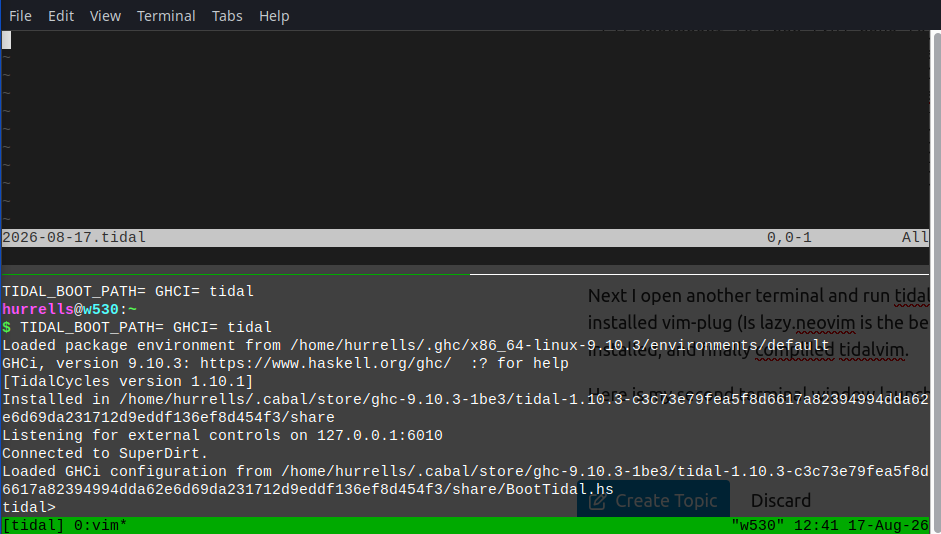
Next I open another terminal and run tidalyvim. On this linux neovim is called nvim. I installed vim-plug (Is lazy.neovim is the better choice?) and got tidal-cycles plugin installed, and finally complied tidalvim.
Here is my second terminal window launch.
So now I paste in my simple tidal pattern ( d1 $ sound "bd") and press . Note it says afterwards that "E21 cannot make changes. modifiable is off. Will fiddle with "set ma" and see if that fixes this one.
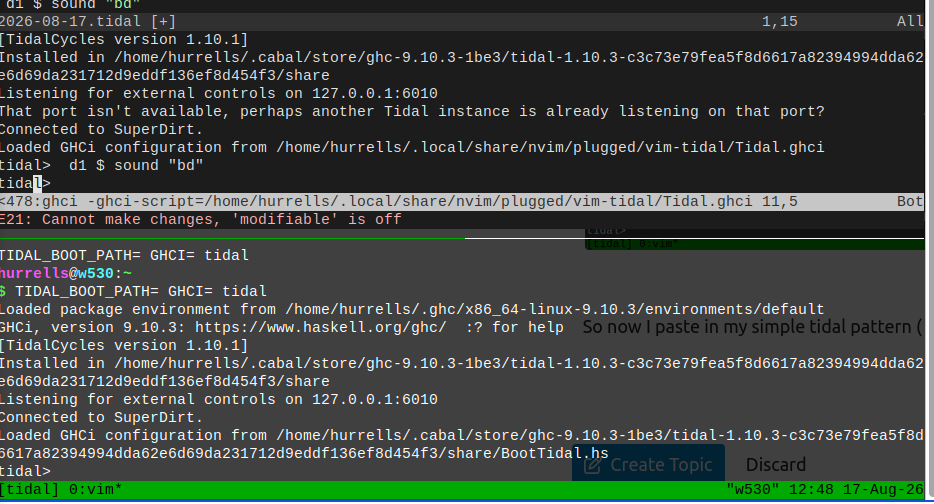
I have give the whole chain of errors in the hope that fixing one may help fix another.
Please let me know what I should try to get a more stable setup. I do prefer vim as that my preferred editor and I do want to get highlighting and some other cool plugins installed there to use later.
S.